M5Paper E-Ink Dashboards for Home Assistant (US Guide, 2026)
There's a small but growing class of Home Assistant users who don't actually want another 24/7 backlit tablet stuck to the wall. They want a piece of paper that shows the weather, today's trash pickup, the thermostat setpoint, and how many kWh the solar array put back into the battery yesterday — and they want it to run on a battery you change once a season, with no cord snaking up the kitchen wall to a USB charger.
That niche is what M5Stack's PaperS3 and the newer PaperColor are aimed at. Both are ESP32-S3 devkits with an e-ink screen, a battery, Wi-Fi, and (with some care) workable ESPHome support. Stick one to the fridge with magnets, point it at your Home Assistant instance, and you've got a glanceable dashboard that survives a power blip and doesn't light up the kitchen at 3am.
This guide is the honest version: what works today, what's still rough, which model to buy for which job, and what you'll actually spend in time getting one onto your wall.
The two devices that matter
M5Stack makes a handful of e-ink products. Two are worth your time for a Home Assistant glance display:
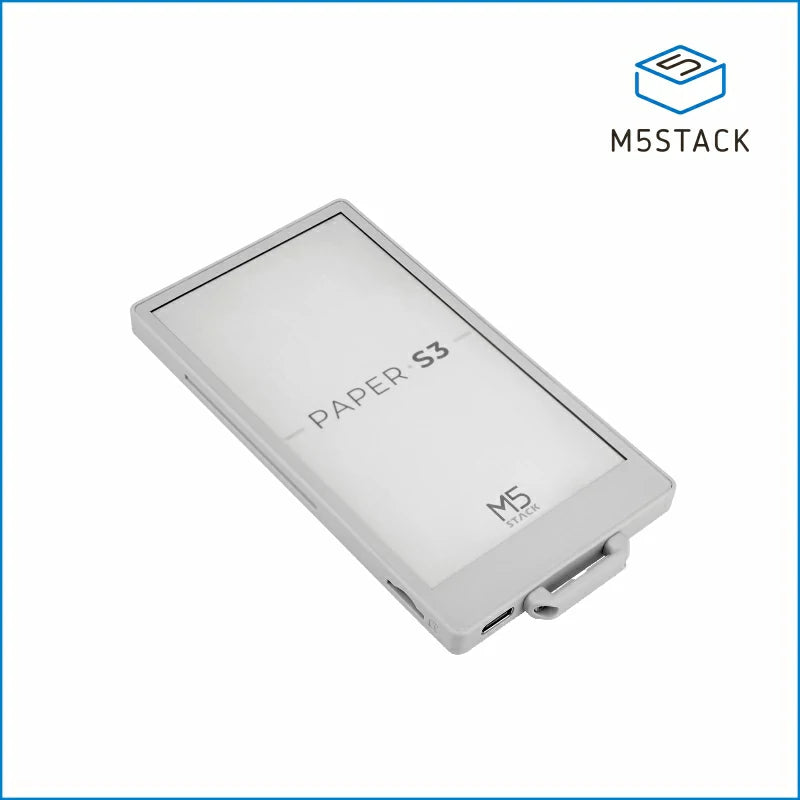
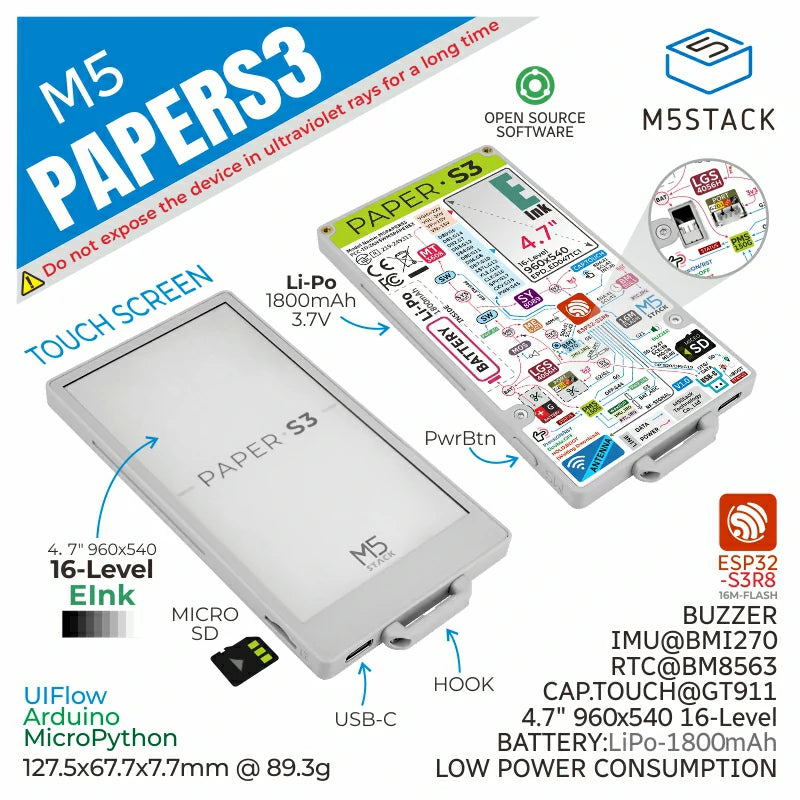
M5Stack PaperS3 — 4.7-inch monochrome e-ink, 960×540 pixels at 235 ppi, 16-level grayscale, with a GT911 capacitive multi-touch panel over the top. ESP32-S3R8 with 8MB PSRAM and 16MB flash, microSD slot, a built-in 1,150–1,800mAh lithium battery (vendor pages cite different cells in different production runs — check the box) and a BM8563 RTC so it can deep-sleep between refreshes. The screen is fine for almost any HA dashboard that doesn't depend on color to convey meaning — temperatures, schedules, energy charts, calendar entries, family chore lists.
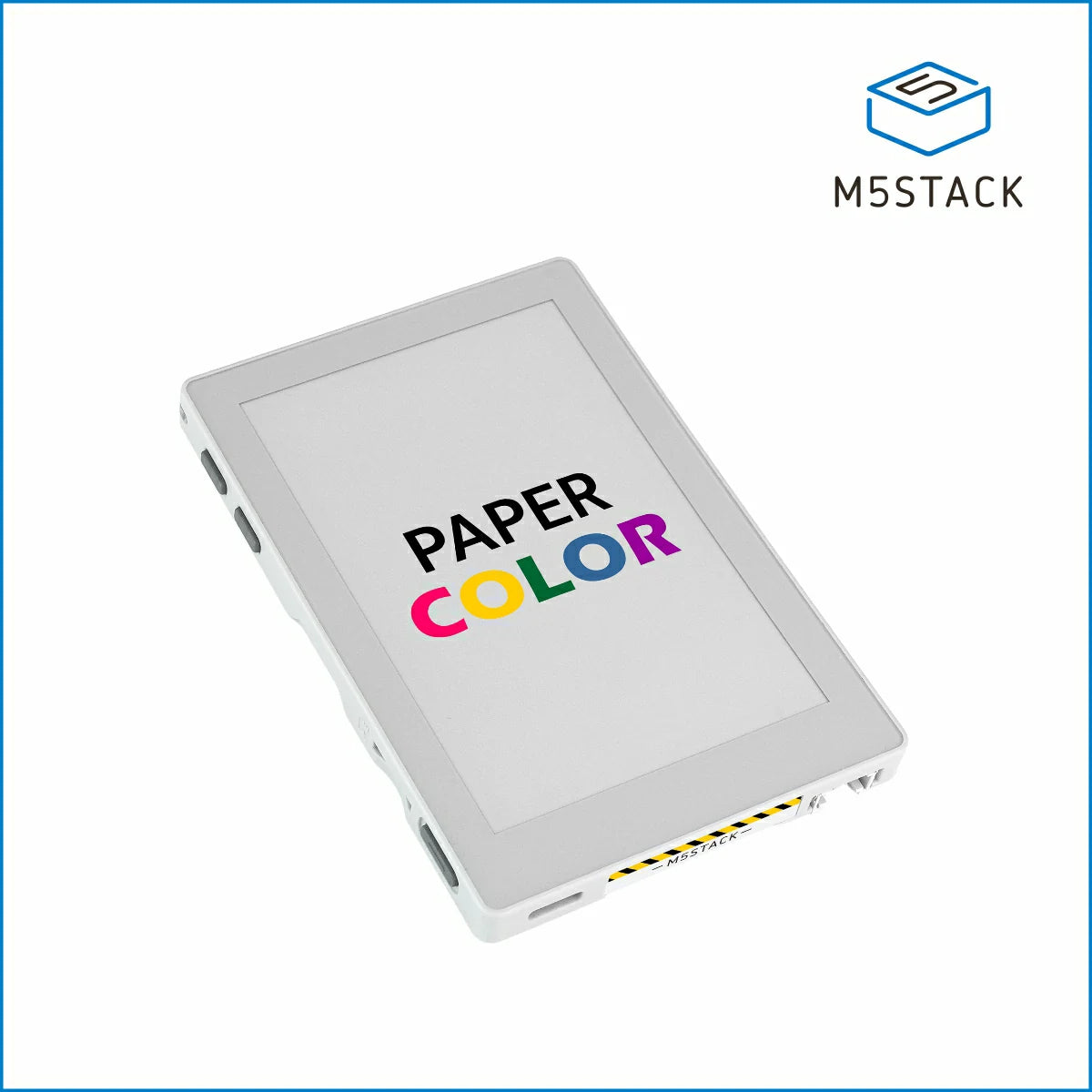
M5Stack PaperColor — the newer 2026 release. 4-inch E Ink Spectra 6 panel at 600×400, full 6-color (the Spectra 6 set: black, white, red, yellow, blue, green) with no grayscale halftones — it's posterized, not photographic. ESP32-S3, microSD, temperature and humidity sensor on board, microphone with echo cancellation, 1W speaker, two RGB LEDs, IR transmitter, Grove connector. No touch panel on this one — control is via three physical buttons. List price $75 direct from M5Stack's store; US availability is currently strongest through M5Stack direct (ships from China, allow 7–14 days), with Mouser, DigiKey and a handful of maker-focused US distributors starting to carry inventory.
Both refresh slowly (1.5–3 seconds for a full screen on the PaperS3; longer on the color Spectra 6 — that's the trade for the color panel). Neither is a replacement for a wall-mounted Lenovo tablet running the HA app — they're for glance, not interaction.
What you'd actually put on the screen
A few useful jobs they're well-suited to:
- The "kitchen wall" dashboard: today's weather, tomorrow's forecast, trash and recycling pickup, the kids' school schedule, who is or isn't home, current thermostat setpoint.
- The "solar and battery" page: yesterday's PV total, today so far, battery state of charge, today's TOU peak window and whether you're set to charge or discharge through it.
- The "what is the HVAC actually doing" page: per-room temperatures, which mini-splits are running, current setpoint vs current actual, HVAC runtime so far today.
- The "kids' chores / family wall": a simple checklist that updates from a HA helper, with the satisfying click of a physical button to mark something done (PaperColor has buttons; PaperS3 has touch).
- The "next departure" sliver: a tiny widget tucked by the front door showing the next train, bus or Uber estimate, refreshing every 15 minutes during commute hours and sleeping the rest of the day.
What they're not good for: anything that needs sub-second feedback (light switches, dimmer sliders), anything where partial-screen redraws would look fine on an LCD but look ghosted on e-ink, anything that depends on smooth animation, and anything in a low-light area where the lack of backlight means you can't read the screen at night.
ESPHome support — the honest reality check, May 2026
This is the part most "M5Paper + Home Assistant" blog posts skip past. As of May 2026, neither device has first-party support in the upstream ESPHome waveshare_epaper component. The PaperS3 specifically uses an ED047TC1 driver that needs the epdiy external library, and the version of epdiy that compiles cleanly against ESP-IDF 5.5.1 (which current ESPHome ships against) is a community fork, not the upstream branch.
Concretely, getting a PaperS3 running on ESPHome today looks like this:
- Pull in the epdiy library from the maintained fork (Frogy76's repo on GitHub, which patches three ESP-IDF 5.5.1 breaking changes — removed GPIO macros and similar).
- Add patrick3399's
esphome_componentsexternal repository for the touch panel binding and theed047tc1display platform. - Pin your ESPHome project to a known-good ESP-IDF version (5.4 still works; 5.5.1 works only via the fork).
- Accept that a future ESPHome release could break the chain and you'll spend a Saturday on GitHub issues.
The PaperColor's Spectra 6 panel is even less well-trodden. There's no shipping ESPHome platform for it at the time of writing. You can run it from Arduino/PlatformIO with M5Stack's own libraries and bridge to Home Assistant via MQTT, which works fine but is a different shape of project from "drop a YAML file in ESPHome and forget about it."
If you want a pure-ESPHome-native experience today, the PaperS3 is your only realistic pick, and you should plan on a Saturday afternoon getting the first YAML to compile.
What it'll actually cost you (US, including time)
The hardware bill is the small part.
M5Paper S3 — currently around $90–$110 delivered in the US. Direct from M5Stack runs about $79 + shipping; Mouser and DigiKey carry stock variably at slightly higher list price but faster delivery and friendlier returns. A flat-back wall mount or fridge magnets you almost certainly already own. Total: $90–$110 landed.
M5Paper Color — $75 direct from M5Stack; expect $90–$110 landed with shipping. US distributor inventory is thin at time of writing; cross-check before you order.
The time bill is bigger:
- First YAML compile, including chasing the fork instructions: 2–4 hours for someone comfortable with ESPHome.
- Designing the actual dashboard layout — fonts, partial refresh strategy, deep-sleep budget: another 2–4 hours if you want something you'll be proud to leave on the fridge.
- Live-with-it-for-a-fortnight tweaks (refresh interval is too aggressive, the weather widget chops, the touch areas are wrong on a wall mount): a few hours over the following weeks.
A weekend of evenings, end-to-end, for someone who likes this sort of thing. Two-to-three weekends if you don't, which is the honest cliff most people hit and is why most M5Paper projects end up half-finished in a drawer.
What habbb does with these (and what we won't do)
We run a managed Home Assistant service. In the US our subscription is BYOHA only — $60/month, no hardware, billing-address sales tax handled at checkout. The subscription is a maintenance contract — we keep what you've already got working — and that explicitly doesn't include new device builds. An M5Paper dashboard is a new build: new firmware, new YAML, new layout, new deep-sleep tuning, new long-term watch-it-for-a-month-and-tune-it cycle.
So this isn't part of the $60/month BYOHA subscription. We will answer your questions over email if you're a habbb customer, fact-check the guide you're reading now, and host the Pi-side of the integration on the hub we manage. The dashboard build itself — if you want us to do it for you rather than DIY — is a one-off quote, same shape as our other custom integration work.
If you'd rather we build it for you than do it yourself, drop us a note and mention "M5Paper". We'll come back with a fixed-price quote (you'll see the number before you commit) covering: device sourcing, firmware build, three layout options to pick from, install on your hub, two weeks of post-install adjustment included. We're not turning this into a productized line yet — we're building it for the first few people who want it and seeing whether it has legs.
If you want to build it yourself, the rest of this guide gets you most of the way.
The minimal "it works" build — PaperS3 + ESPHome + HA
Rough recipe, in the order you'll do it:
- Buy the PaperS3. US distributor is faster and supports returns; M5Stack direct is cheaper but slower.
- Flash ESPHome onto it via the browser using ESPHome's web installer. You'll need the device in download mode (hold the reset button while plugging in USB-C). First flash gets you onto Wi-Fi.
- Adopt it into your ESPHome dashboard (the HA add-on) and start building the YAML. The display platform won't work yet — that's step 4.
- Add the fork's external components to your YAML. Three blocks:
esp32:(pin framework version and the epdiy fork),external_components:(pull patrick3399's repo),display:(configure theed047tc1platform with the PaperS3's specific GPIO map — copy the example from the fork's README; do not freelance the pin map). - Connect to Home Assistant with the
api:block. Your sensors will appear in HA the moment the device boots; you control what's drawn on screen with lambdas that read those sensor states. - Build a layout in lambdas — start with
it.print(x, y, font, "%.1f°F", id(temp).state)style calls, get one sensor visible, then build out. Don't try to design the whole dashboard before you've seen the first one render; e-ink layout sense is non-obvious until you've tried a couple. - Tune the refresh interval and deep sleep last. Default ESPHome will refresh constantly; for battery life you want a wake → render → sleep cycle, typically every 5–15 minutes for ambient data, every 1 minute if you want a clock display.
A first-cut YAML for a PaperS3 weather-and-HVAC dashboard runs around 200–300 lines, of which 150 is the display lambda. We won't reproduce the whole thing here because the fork's API changes faster than this guide will update — link to the fork's example folder and read what it says today.
Battery life — what to actually expect
Vendor headline numbers are theoretical maxes ("months on a single charge") and they assume you wake once an hour and render a static screen. The realistic numbers for typical glance-dashboard use, based on community reports and habbb's own bench testing:
- One refresh every minute (kitchen clock + thermostat setpoint): 7–10 days.
- One refresh every 5 minutes: 4–6 weeks.
- One refresh every 15 minutes (most "wall calendar" use): 2–3 months.
- Hourly only (overnight weather + trash pickup): 4–6 months.
The killer is Wi-Fi connection cost. The deep-sleep current is negligible; the wake-up Wi-Fi handshake costs roughly the same whether you stay awake for 2 seconds or 20. So fewer-but-longer wakes beat many-short wakes for the same battery budget. Design the wake schedule around what data actually changes that often — the trash pickup day doesn't need refreshing at 2:32pm.
Where the limitations bite
Three real-world ones we've hit:
Ghosting. Run the screen long enough on partial refreshes and a faint outline of the previous frame stays visible. The fix is a full-screen clear ("flash") every 10–20 partial refreshes. Build it into the firmware and you'll never see it; forget it and after a fortnight your dashboard looks haunted.
Wi-Fi roaming. ESP32-S3 Wi-Fi will sometimes wake up to a different AP than it went to sleep with, and the reconnect adds a couple of seconds and a measurable battery hit. Mitigation: stick to one AP for the device, or use a dedicated 2.4GHz IoT SSID without band-steering. If your mesh router (eero, Orbi, TP-Link Deco) has a "prefer 2.4GHz for IoT" setting, turn it on for this device's MAC.
Touch is fiddly behind glass. If you put the PaperS3 inside a picture frame for the spouse-acceptance-factor finish, the GT911 touch panel still works through thin (~1mm) glass but loses accuracy. Stick to acrylic if you want touch to feel right, or pick the PaperColor and use its physical buttons.
Should you buy one?
The honest test for whether this is a project you'll finish:
- You've used ESPHome before and the phrase "external components from a community fork" doesn't make you want to lie down.
- You have a specific glance-display job in mind — not "I'll figure out something to put on it" but "I want to see X, Y and Z from the kitchen without unlocking my phone".
- You're OK with a 2026-fork-maintainer experience: things might break on ESPHome upgrades, you'll need to follow the GitHub thread.
If all three are yes, the PaperS3 is the best ~$100 e-ink project in 2026 for a Home Assistant household. Get one, give yourself a weekend, accept the first version will be ugly, iterate.
If any are no, the answer is to either wait for first-party ESPHome support (which is a question of when, not if — the PaperS3 has enough community demand that it'll land eventually) or ask habbb to build it for you as a one-off.
FAQs
Will a PaperS3 dashboard work without exposing Home Assistant to the internet?
Yes. The device only needs to talk to your local Home Assistant instance over LAN. As long as the M5Paper and the HA hub are on the same Wi-Fi network, no external exposure is required.
Why not just use a cheap tablet?
Different jobs. A tablet is a fully interactive control surface that's always on, always backlit, always plugged in, and looks like a tablet on your wall. An M5Paper is a battery-powered piece of paper for glance information. Most homes that have both don't see them as competing — the tablet runs the HA dashboard you actually press buttons on; the M5Paper sits somewhere else doing the trash-pickup-and-weather job the tablet would be overkill for.
Does habbb sell the M5Paper as part of the US BYOHA service?
Not today. The $60/month BYOHA subscription covers managed maintenance of your existing Home Assistant — it doesn't bundle hardware accessories. If you want one as part of your setup, we'll add it to a one-off quote; we won't fold it into the subscription scope.
Is the PaperColor worth waiting for ESPHome support on?
If color matters to your specific dashboard (you want red-amber-green status indicators, or branded calendar entries, or a kids' chore board that actually looks fun), and you can wait six months for the ESPHome community to land Spectra 6 support, yes. If you'd be using color purely cosmetically, the PaperS3 in monochrome plus thoughtful layout will look better than a mediocre Spectra 6 layout — the color palette is six-color-posterized, not photographic, so a clean grayscale design beats a clumsy color one nearly every time on these panels.
Product photos: M5Stack. Used under fair-use editorial coverage; see M5Stack's PaperS3 product page and PaperColor product page for current spec and pricing.